
Overview
You will learn
- How to enhance a proxy interface in SAP Application Interface Framework using the preprocessing capability
- How to implement data checks and mappings in SAP Application Interface Framework


Prerequisites
Prerequisites
- You’ve set up SAP Application Interface Framework
- SAP S/4HANA 1709 or later, AIF 4.0
- You’ve completed the tutorial Create a Simple Proxy Interface
Steps
Intro
In this tutorial, you will learn how to enhance a simple proxy interface in SAP Application Interface Framework by enabling the preprocessing capability.
Go to Customizing for SAP Application Interface Framework (transaction code /n/AIF/CUST) and navigate to Interface Development > Define Interfaces. In the upcoming dialog, enter your previously created namespace DEMO_2, and continue.
Enable Change mode. Double-click the existing interface FLBOOK to open it and select the Pre-Processing flag.

Save your changes.
While in Customizing (transaction code
/n/AIF/CUST), navigate to Interface Development > Define Structure Mappings.In the upcoming dialog, enter your previously created namespace
DEMO_2, interface nameFLBOOK, and interface version1. Select Continue.Select New Entries and enter the root node of your interface structure, here
SXIDAL_FBO_REQUEST.
Create New Source Structure Select the new entry and double-click Assign Destination Structure in the menu on the left.
Select New Entries and enter the Number of Structure Mapping
10. As Destination Structure, enter the same root node of your interface structure,SXIDAL_FBO_REQUEST. Finally, select the Move Corresponding Fields flag.
Assign Destination Structures Save your changes.
In Message Maintenance (transaction code SE91), create a new message class named ZDEMO_MESSAGE. In tab Messages, add a new message with the message short text Agency must not be empty.

Save your changes.
Go back to Customizing > Interface Development > Define Structure Mappings to see the structure mapping of your interface and add a check. Enter your namespace
DEMO_2, interfaceFLBOOK, version1, and continue.With your source structure
SXIDAL_FBO_REQUESTselected, double-click the node Assign Checks in the menu on the left. In Change mode, select New Entries to add a new check, and enter or select the following details:Field Value Number of the Check 10Namespace DEMO_2Check AGENCY_EMPTYCheck Raw data check the flag Ignore Data If Check Is Not Successful Treat as error if check is not successfulField name 1 AGENCY_DATA-AGENCY_IDPress Enter. Because the check doesn’t exist yet, you are asked to create the new check.

Add New Check Save the new entry.
Double-click the new check to further define it. A new window opens in which you can enter the following information:
Field Value Check Description Enter a meaningful description, for example Check agency not emptyError Message Class ZDEMO_MESSAGEError Message Number 002
Define Check Navigate to Define Single Checks and enter the following information for the single check:
Field Value Check Description Enter a meaningful description, for example Check agency not emptyField Check Not Empty
Define Single Checks Save your changes and close the new window.
Go to Customizing for SAP Application Interface Framework (transaction code /n/AIF/CUST) and navigate to Error Handling > Define Interface-Specific Features.
In the upcoming dialog, enter namespace DEMO_2, interface FLBOOK, and version 1, then press Enter.
Double-click Define Changeable Fields in the menu on the left. Add a new entry with Index number 10 and Field Path AGENCY_DATA-AGENCY_ID.

Save your changes.
After the setup is complete, you should test your settings and verify that the check and the proxy monitoring are working as planned.
For detailed steps about sending test messages, see the tutorial Create a Simple Proxy Interface.
Send in a new test message with an empty agency ID.

If you’re using SAP GUI, check the results of your test in the Interface Monitor (transaction code /n/AIF/IFMON).
When you select the summary line for your recipient, you’re forwarded to Monitoring and Error Handling, where you can see your selected test message. It should be in status Error with the message text Agency must not be empty.

As you can see from the data, the field AGENCY_ID is empty. Since you defined the field as a changeable field in the previous step, you can fix the issue by maintaining a value for the empty field, here 109. Save and restart the message.

Alternatively, if you have set up Message Monitoring in the SAP Fiori launchpad, you can check the test results there. For more information, see How to configure the SAP Fiori Apps for SAP Application Interface Framework.
In the Message Monitoring app, select the message, switch to Edit mode, and change the agency ID. Save your changes.
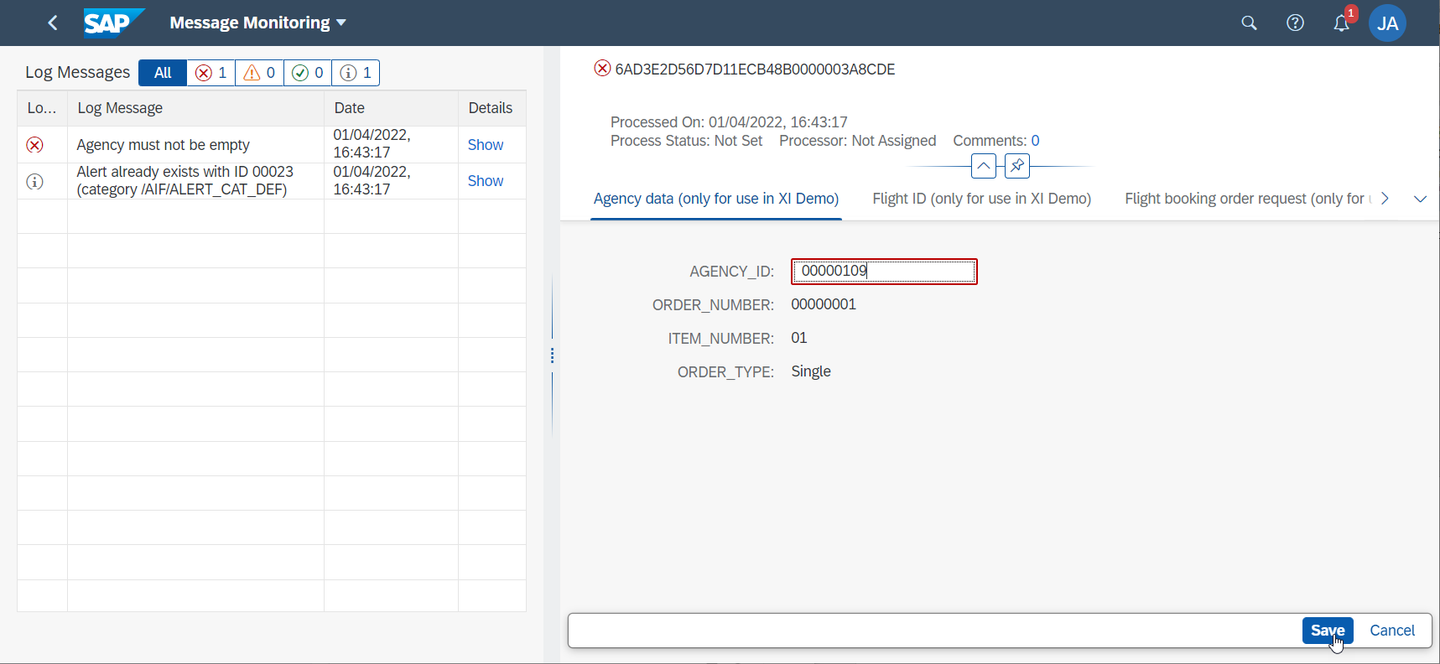
Select Restart. After the restart, the message is processed successfully.

Congratulations! You have enhanced a proxy interface with preprocessing in SAP Application Interface Framework.
Resources
Discussion
Share feedback on this tutorial or join the conversation in SAP Community.