
Overview
You will learn
- How to create an instance of SAP HANA Cloud
- How to connect to a SAP HANA Cloud or an SAP HANA on premise database


Prerequisites
Prerequisites
- A Microsoft Windows, Linux, or Mac computer
- A machine that can run SAP HANA on premise if SAP HANA Cloud free tier is not used
Steps
Intro
This tutorial covers how to configure an SAP HANA instance in the cloud or on-premise, to enable connections through various SAP HANA Client interfaces, along with tips to streamline the process and avoid common pitfalls.
For more information on SAP HANA Cloud, consult Introduction to SAP HANA Cloud.
Access help from the SAP community or provide feedback on this tutorial by navigating to the Feedback link located on the top right of this page.
For connections from additional sources such as SAP Analytics Cloud,
JupyterNotebooks, SAP Business Warehouse, SAP Data Intelligence Cloud, and SAP ERP Central Component see Connection Guides for SAP HANA Cloud.For connections to the SAP HANA Cloud, Data Lake, see the tutorial Use Clients to Query Data Lake Relational Engine.
IMPORTANT: Complete the first 3 tutorials, and then you can select any of the following tutorials about connecting with different client interfaces.
There are multiple versions of SAP HANA. The information below is a list of links for the documentation of each version.
| Version | Notes |
|---|---|
| SAP HANA Platform 2.0 | Released in November 2016. Current version is 2.0 SPS 08, which was released on Nov 20th, 2024. |
| SAP HANA Cloud | Released in March 2020. New features are released quarterly. |
Here are a few benefits of using SAP HANA Cloud:
Software updates are automatically applied by SAP.
Hardware is managed by a cloud provider (e.g. AWS, Azure, or GCP).
Many data center locations to choose from as listed in the SAP Discovery Center
Backups are automatic and recovery can be initiated in SAP HANA Cloud Central.
The memory, compute and storage settings can be changed as your needs change. Note a few operations can be performed using service requests.
The ability is provided to expand data storage from in-memory, to native storage extensions, to a data lake, while providing a common access layer that enables you to have further control over performance and cost. See also Lower Your Data Management Costs With SAP HANA Cloud.
Here are a few differences between SAP HANA Cloud and an on-premise version:
Every SAP HANA Cloud instance is one SAP HANA database. SAP HANA Cloud as of 2024 QRC 4 offers multitenancy support. For further details see The next step towards cost-effectiveness and scalability with SAP HANA Cloud Multitenancy. On-premise SAP HANA also has a concept of tenant databases (a system database and one or more tenant databases) but in a different manner from SAP HANA Cloud. For further details see SAP HANA Tenant Databases.
The administration user for SAP HANA Cloud is named DBADMIN while for an SAP HANA 2.0 database it is SYSTEM. For additional details see Predefined Users, SAP HANA Cloud Administrator DBADMIN, and Predefined Users in HANA 2.0.
The administration tool for SAP HANA Cloud is SAP HANA Cloud Central. The administration tools for the on-premise include the SAP HANA cockpit and the SAP HANA database explorer.
Information on the instance size steps for SAP HANA Cloud, SAP HANA databases can be found at Create an SAP HANA Database Instance Using SAP HANA Cloud Central. Service plan, pricing and data center availability can be found at SAP HANA Cloud Service (SAP Discovery Center). Details on limitations can be found at System Limitations. Compatibility information can be found at Compatibility with Other SAP HANA Versions. Additional details can be found at What is SAP HANA?.
To complete the tutorials in the mission, an SAP HANA instance is needed. Step 3 and 5 in this tutorial provide two different, free options that can be used to set up an SAP HANA instance. Only one of these steps needs to be completed if you currently do not have access to an SAP HANA instance.
The instructions on how to setup a free SAP HANA Cloud instance within the SAP Business Technology Platform (SAP BTP) are well covered in a number of other sources listed below. The SAP BTP Trial is available on the US10 and AP21 landscapes. When using the free SAP HANA Cloud service in productive landscapes, there is an option to transition the service from free tier to a paid service.
Set Up Your SAP HANA Cloud, SAP HANA Database and Understand the Basics
SAP Learning Journey - Provisioning and Administering Databases in SAP HANA Cloud
SAP Discovery Center - SAP HANA Cloud, SAP HANA Database Fundamentals
For more information on SAP BTP see the following product pages and help documentation:
https://www.sap.com/products/business-technology-platform.html
https://developers.sap.com/topics/business-technology-platform.html
Continue with this tutorial once you have created an SAP HANA Cloud instance as shown below.

Once the SAP HANA Cloud instance is created, take note of the SQL endpoint (host:port) needed to connect to the database. The endpoint can be obtained within the Actions menu on the Instances page. This will be needed in subsequent tutorials in the mission.

SQL Endpoint The SAP HANA Cloud, HANA database free tier instances are shut down on a nightly basis and will need to be restarted before working with them the next day.
From the Actions menu, Open a SQL console for your database instance.
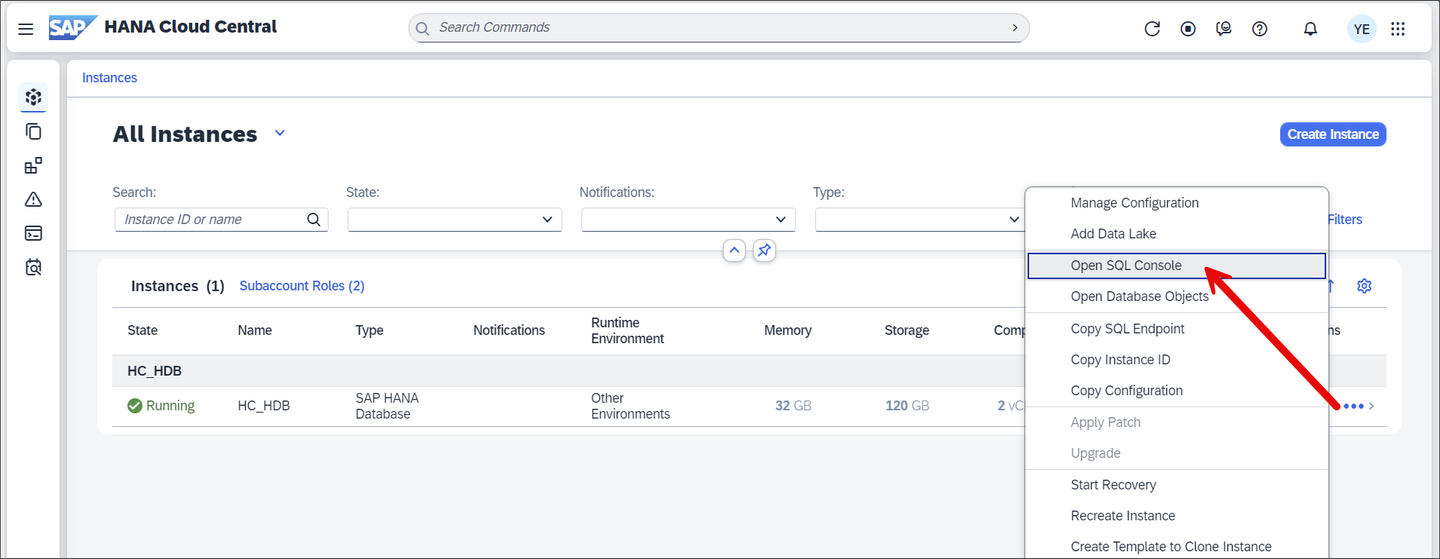
Open SQL console If needed, you will be asked to enter the credentials for the database. Enter DBADMIN and the password that was specified when the instance was created.
The SAP HANA database explorer provides the ability to browse catalog objects and execute SQL statements from the SQL console. For more information, see the tutorial group Get Started with the SAP HANA Database Explorer, SQL Console and SAP HANA Database Explorer.
Run the following query to see the name of the database you are currently connected to.
SQLSELECT * FROM M_DATABASE;
Database Explorer Result A schema is a container for other database objects such as tables and views and the current schema can be seen via SQL as shown below. The DUMMY table is available in every HANA database that has one column and one row. It provides a convenient way to call a function or perform a simple test.
SQLSELECT CURRENT_USER, CURRENT_SCHEMA FROM DUMMY;
SQL console results To see the list of services, enter the following SQL statement:
SQLSELECT * FROM M_SERVICES;To see information about the database server, enter the following SQL statement:
SQLSELECT * FROM M_HOST_INFORMATION;
Views starting with
M_are examples of monitoring views and contain statistics and status details.
Congratulations! You have connected to SAP HANA Cloud and performed a few queries.
This step only needs to be completed if you currently do not have access to an SAP HANA Instance and did not set up an SAP HANA instance using the SAP HANA Cloud free tier as explained in step 3.
A default installation will contain one system database named SYSTEMDB and one tenant database which in this example is named HXE.
The system database contains information about the tenant database(s) and is used for overall administration. The default port for the system database is 39013. Later in this tutorial mission, a connection to the tenant database will be made and tables will be created and populated with data. For more information, see SAP HANA Tenant Databases Operations Guide.
The SAP HANA on premise includes a command line tool (part of the SAP HANA client install) called HDBSQL that can be used to query the database.
The following steps will demonstrate connecting to and examining a SAP HANA on premise edition database.
Enter the following to connect to the system database:
Shellhdbsql -n localhost:39013 -u SYSTEM -p Your_Password
hdbsql connected Notice that the database being connected to is SYSTEMDB.
The example above uses localhost since hdbsql is running on the same machine that the database is trying to connect to. The host name,
hxehost, is seen in the terminal above.If hdbsql is not found and you are logged in with another user, try connecting as the user
hxeadmand run the command again.Shellsu hxeadmIf the hdbsql command cannot be found, simply read through the following examples. The installation and further examples of running HDBSQL will be covered in subsequent tutorials.
Determine the IP address of the machine that is running SAP HANA on premise. Record the value as it will be needed in later tutorials in the mission. It is important to note the IP address or host name of the machine, as this will be needed in later tutorials.
Shellip addrThe following are a some examples of interactive options followed by a SQL query, which when run against SYSTEMDB returns information about the databases running on the SAP HANA instance.
SQL\al on \pa off \s SELECT * FROM SYS_DATABASES.M_SERVICES WHERE SQL_PORT != 0; \serverstats
hdbsql commands The
\alor align interactive option when enabled increases the readability of the output.The
\scommand shows status information. It shows that that the SAP System Identification (SID) is HXE, that the connected database is SYSTEMDB, and the currently logged in user is SYSTEM.The result of the SELECT against the
M_SERVICEStable shows that there are two databases, named SYSTEMDB and HXE and that they are accessible on ports 39013 and 39015.The ‘\serverstats’ retrieves resource consumption information about the last executed SQL statement which can be helpful when diagnosing SQL statements.
The instance number can be derived from a port number using the second and third numbers in the port number 39013. In this case, the instance number is 90.
If the SQL statement returns more than one screen of text, entering a space will show the next screen of results. See also the pager option
\pa.Enter one of the below commands to exit from viewing the results of the select statement. Note that commands can be prefixed with a forward slash(\) or a colon(:).
SQL\q :qConnect using the instance number and database name as shown below.
Shellhdbsql -n localhost -i 90 -d HXE -u SYSTEM -p Your_PasswordEnter the following to display database connection information.
SQL\sNotice that this time the database connected to is HXE.

hdbsql commands For further information, see Port Assignment in Tenant Databases and Connecting to SAP HANA Databases and Servers.
Congratulations! You now have access to an SAP HANA instance and understand some of the differences between SAP HANA Cloud and SAP HANA on premise.
Resources
Discussion
Share feedback on this tutorial or join the conversation in SAP Community.